StackSaga Cassandra Reactive Support
stacksaga-cassandra-reactive-support is the reactive (non-blocking) Cassandra adapter for the StackSaga engine.
It handles two concerns that every distributed transaction system must address:
-
Event Store — persisting the full state of every saga transaction.
-
Recovery Engine — automatically recovering transactions that failed or went missing, without any developer intervention.
This guide covers both concerns completely, starting with the setup steps and ending with a deep-dive into the Recovery Engine’s internal architecture.
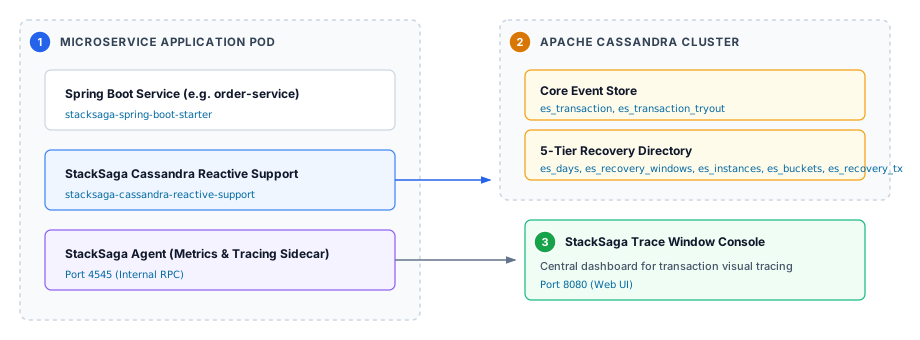
The system operates across three interconnected environments:
| 1 | Microservice Application Pod: Live Spring Boot microservices (such as order-service) integrating stacksaga-spring-boot-starter and stacksaga-cassandra-reactive-support. |
| 2 | Apache Cassandra Cluster: Distributed data tier storing both the Core Event Store (es_transaction, es_transaction_tryout) and the 5-Tier Recovery Directory. |
| 3 | StackSaga Trace Window: Central web observability console connected via the StackSaga Agent sidecar (port 4545/8080) for real-time visualization of saga state. |
|
Retry Ordering Guarantee: If your use case requires exact microsecond FIFO ordering (e.g., a financial order-matching engine), consider using a SQL-based event store module (PostgreSQL or MySQL) instead. |
Part 1: Setup
Step 1: Add the Dependency
<dependencyManagement>
    <dependencies>
        <dependency>
            <groupId>org.stacksaga</groupId>
            <artifactId>stacksaga-bom</artifactId>
            <version>1.0.0-SNAPSHOT</version>
            <type>pom</type>
            <scope>import</scope>
        </dependency>
    </dependencies>
</dependencyManagement>

<dependency>
    <groupId>org.stacksaga</groupId>
    <artifactId>stacksaga-cassandra-reactive-support</artifactId>
</dependency>| Use StackSaga Initializer to generate a project with all dependencies pre-configured. |
Step 2: Create the Keyspace and Schema
StackSaga uses one shared keyspace and static table names across all services and environments. Service scoping, multi-tenancy, regional isolation, and virtual clusters are all handled through composite partition keys — no dynamic table generation, no per-service schemas.
Create the Keyspace
CREATE KEYSPACE IF NOT EXISTS stacksaga_event_store
WITH replication = {
  'class': 'NetworkTopologyStrategy',
  'datacenter1': 3
}
AND durable_writes = true;
For local development, use 'class': 'SimpleStrategy', 'replication_factor': 1.
|
Execute the Schema Script
Run the full schema script in your Cassandra cluster. The script creates 9 tables divided into two logical groups:
| Group | Tables | Purpose |
|---|---|---|
Core Event Store (4 tables) |
|
Stores the primary state and metadata for every saga transaction. |
|
Stores the execution history (each saga step attempt) for every transaction. |
|
|
Quarantines transactions where even the compensation step failed unrecoverably. |
|
|
Stores idempotency leases to prevent duplicate step execution in Kafka-based event streaming. |
|
5-Tier Recovery Engine (5 tables) |
|
Tier 1: Active calendar dates index. |
|
Tier 2: Minute-window index per day. |
|
|
Tier 3: Pod instance index per minute window. |
|
|
Tier 4: Bucket allocation index per pod instance. |
|
|
Tier 5: Bounded recovery metadata partitions. |
schema.cql)USE stacksaga_event_store;
-- ═══════════════════════════════════════════════════
-- CORE EVENT STORE TABLES (4 tables)
-- ═══════════════════════════════════════════════════
CREATE TABLE IF NOT EXISTS es_transaction (
region text,
cluster text,
service_name text,
transaction_id uuid,
running_status text,
created_at timestamp,
updated_at timestamp,
payload blob,
restore_date text,
restore_window int,
restore_instance_id text,
restore_bucket int,
PRIMARY KEY ((region, cluster, service_name, transaction_id))
);
CREATE TABLE IF NOT EXISTS es_transaction_tryout (
region text,
cluster text,
service_name text,
transaction_id uuid,
tryout_index int,
executor text,
execution_type text,
status text,
created_at timestamp,
PRIMARY KEY ((region, cluster, service_name, transaction_id), tryout_index)
) WITH CLUSTERING ORDER BY (tryout_index ASC);
CREATE TABLE IF NOT EXISTS es_frozen_transaction (
region text,
cluster text,
service_name text,
transaction_id uuid,
frozen_at timestamp,
reason text,
PRIMARY KEY ((region, cluster, service_name, transaction_id))
);
CREATE TABLE IF NOT EXISTS es_execution_markers (
region text,
cluster text,
service_name text,
transaction_id uuid,
step_id text,
execution_state text,
PRIMARY KEY ((region, cluster, service_name, transaction_id), step_id)
);
-- ═══════════════════════════════════════════════════
-- 5-TIER HIERARCHICAL RECOVERY ENGINE TABLES (5 tables)
-- ═══════════════════════════════════════════════════
-- Tier 1: Active Calendar Dates
CREATE TABLE IF NOT EXISTS es_days_by_year (
region text,
cluster text,
service_name text,
year int,
date_of_year text,
PRIMARY KEY ((region, cluster, service_name, year), date_of_year)
) WITH CLUSTERING ORDER BY (date_of_year ASC);
-- Tier 2: Minute Windows per Day
CREATE TABLE IF NOT EXISTS es_recovery_windows_by_day (
region text,
cluster text,
service_name text,
date_of_year text,
minute_of_day int,
PRIMARY KEY ((region, cluster, service_name, date_of_year), minute_of_day)
) WITH CLUSTERING ORDER BY (minute_of_day ASC);
-- Tier 3: Pod Instances per Window (token-partitioned)
CREATE TABLE IF NOT EXISTS es_instances_by_recovery_window (
region text,
cluster text,
service_name text,
date_of_year text,
minute_of_day int,
instance_id_token bigint,
instance_id text,
PRIMARY KEY ((region, cluster, service_name, date_of_year, minute_of_day), instance_id_token, instance_id)
) WITH CLUSTERING ORDER BY (instance_id_token ASC, instance_id ASC);
-- Tier 4: Bucket Allocation per Instance
CREATE TABLE IF NOT EXISTS es_buckets_by_instance (
region text,
cluster text,
service_name text,
date_of_year text,
minute_of_day int,
instance_id text,
bucket_index int,
PRIMARY KEY ((region, cluster, service_name, date_of_year, minute_of_day, instance_id), bucket_index)
) WITH CLUSTERING ORDER BY (bucket_index ASC);
-- Tier 5: Bounded Recovery Metadata Partitions
CREATE TABLE IF NOT EXISTS es_recovery_transactions_by_instance (
region text,
cluster text,
service_name text,
date_of_year text,
minute_of_day int,
instance_id text,
bucket_index int,
transaction_id uuid,
PRIMARY KEY ((region, cluster, service_name, date_of_year, minute_of_day, instance_id, bucket_index), transaction_id)
);Step 3: Configure the Cassandra Connection
StackSaga uses the DataStax Java Driver configuration format.
Create stacksaga-cassandra.conf inside src/main/resources/:
src/main/resources/stacksaga-cassandra.confdatastax-java-driver {
basic {
contact-points = ["cassandra-host-1:9042", "cassandra-host-2:9042"]
load-balancing-policy.local-datacenter = datacenter1
session-keyspace = stacksaga_event_store
}
advanced {
auth-provider {
class = PlainTextAuthProvider
username = cassandra
password = cassandra
}
reconnection-policy {
class = ExponentialReconnectionPolicy
base-delay = 1 second
max-delay = 60 seconds
}
}
}Part 2: The Event Store
Before discussing the Recovery Engine, it is important to understand how StackSaga stores live transaction data. The 4 Core Event Store tables operate independently of the Recovery Engine and are never subjected to polling-queue range scans.
es_transaction — The Primary Transaction Record
Every saga transaction has exactly one row in es_transaction, keyed by transaction_id.
Why doesn’t this cause hot spots?
transaction_id is a UUID — randomly distributed by Cassandra’s Murmur3 partitioner across all cluster nodes with zero coordination.
Even 100,000 concurrent writes land on different nodes uniformly.
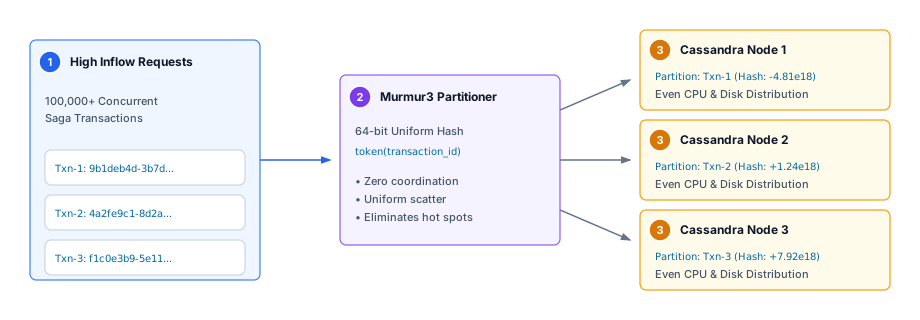
| 1 | High Inflow Requests: Over 100,000 concurrent saga transactions initiated simultaneously across horizontally scaled standard nodes. |
| 2 | Murmur3 Partitioner: Cassandra’s 64-bit Murmur3 hash uniformly scatters transaction_id (UUID) across the token space with zero coordination and zero lock contention. |
| 3 | Even Cluster Scattering: Writes land uniformly across physical nodes, ensuring CPU, memory, and disk I/O remain balanced without hot spots. |
es_transaction_tryout — The Step Execution History
Each saga step attempt (called a "tryout") is stored as a row under the same transaction_id partition key.
Because transaction_id is the partition key in both tables, a transaction and its complete step history always live on the same physical Cassandra node — reading both never requires a network hop.
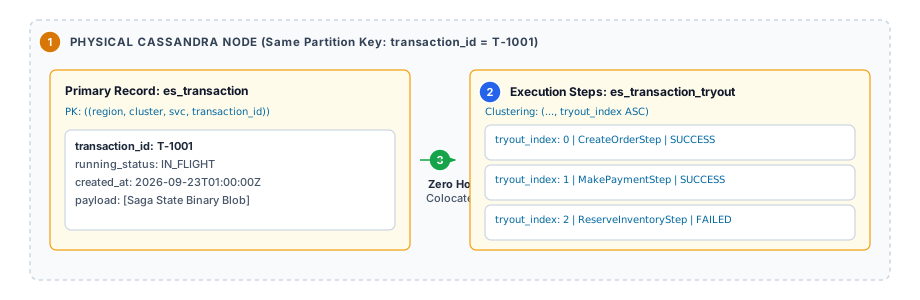
es_transaction_tryout)| 1 | Physical Cassandra Node Colocation: Because es_transaction and es_transaction_tryout share the identical composite partition key region, cluster, service_name, transaction_id, all records for a given transaction reside on the exact same physical node. |
| 2 | Step Execution Clustering Rows: Individual saga attempts append as ordered clustering rows (tryout_index ASC) within the partition. |
| 3 | Zero-Hop Colocated Read: Fetching a transaction and its full step history requires zero cross-node network hops, maximizing read performance. |
es_frozen_transaction — The Quarantine Table
When a compensation step (rollback) itself fails permanently, the transaction moves to es_frozen_transaction.
It is safely isolated from live traffic and requires developer diagnosis and manual re-triggering via the administrative restore endpoint.
es_execution_markers — The Idempotency Lease Table
When using Kafka as the event source, the same event can be re-delivered due to consumer rebalances, pod restarts before offset commits, or network retries.
es_execution_markers stores a per-step execution marker, so already-processed steps are detected and skipped before any business logic runs.
Part 3: Write Protection (Kafka Event Sourcing)
If you are using Kafka for event-driven saga execution, StackSaga provides configurable duplicate prevention to handle Kafka’s at-least-once delivery semantics.
How Duplicate Events Happen
Kafka guarantees that every message is delivered at least once, not exactly once. The most common causes of re-delivery are:
-
Consumer group rebalances during pod scaling
-
Pod restarts before offset commits are flushed
-
Network timeouts causing automatic message retries
Without protection, the same saga step could execute twice — charging a payment twice, creating two shipments, or sending two notification emails.
STRICT Mode — Mutual Exclusion with Cassandra LWT
STRICT mode uses Cassandra Lightweight Transactions (Paxos-based) to acquire an exclusive execution lease before running any business logic:
STEP 1: INSERT INTO es_execution_markers ... IF NOT EXISTS USING TTL <leaseDuration>
         → If the row was NOT there: this pod holds the lease. Proceed.
         → If the row WAS already there (TTL > 0): another pod is executing. Back off and retry after TTL.
         → If the row WAS already there (TTL = 0): already committed permanently. Skip.

STEP 2: Execute saga step business logic.

STEP 3: UPDATE es_execution_markers SET execution_state = 'COMMITTED', TTL = 0
         → Converts the temporary lease to a permanent marker.
         → All other pods now see TTL = 0 and terminate cleanly.
If the pod crashes between Step 1 and Step 3, the temporary lease expires after its TTL, and another pod can safely re-acquire and complete the step.
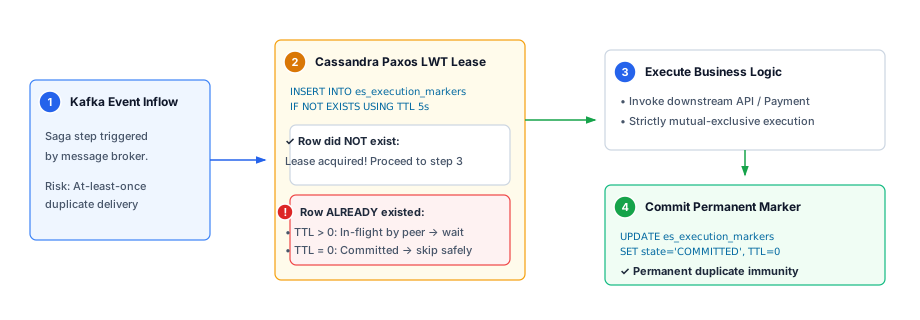
| 1 | Kafka Event Inflow: A saga step execution event arrives from Kafka with potential at-least-once duplicate delivery. |
| 2 | Paxos LWT Lease Acquisition: The pod executes an atomic INSERT … IF NOT EXISTS USING TTL 5s into es_execution_markers. If a lease exists with TTL > 0, the pod backs off; if TTL = 0, it skips. |
| 3 | Mutual Exclusive Execution: The single pod holding the active lease executes the saga business logic. |
| 4 | Permanent Marker Commit: On success, the marker is committed with TTL = 0, conferring permanent duplicate immunity. |
RELAXED_WITH_DEDUP Mode — Lightweight Read Check
RELAXED_WITH_DEDUP skips the LWT (Paxos) overhead entirely.
Before executing, the worker performs a simple read: if a committed marker already exists, it skips.
If two pods arrive at the exact same moment and both read "no marker yet", both will execute — but this is acceptable when the saga step is already idempotent by design.
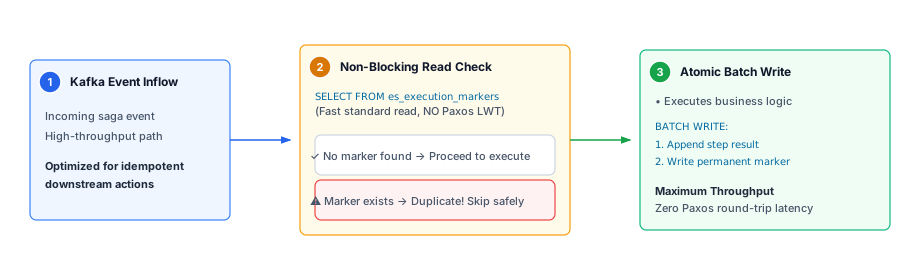
| 1 | Kafka Event Inflow: Event received on high-throughput streaming pipelines where operations are inherently idempotent. |
| 2 | Non-Blocking Read Check: Executes a fast read against es_execution_markers without Paxos consensus overhead. If a marker exists, execution terminates immediately. |
| 3 | Atomic Batch Write: Step results and execution markers are committed together in a single logged batch write. |
Use RELAXED_WITH_DEDUP when:
-
Your saga step is inherently idempotent (e.g., setting a value, not incrementing one)
-
Throughput is critical and the double-execution risk is analytically acceptable
Part 4: The Recovery Engine
This is the most architecturally significant part of stacksaga-cassandra-reactive-support.
The Recovery Engine solves a fundamental problem in every long-running distributed transaction system: transactions can stall or disappear, and the framework — not the developer — must detect and fix them automatically.
It provides two independent but architecturally unified features:
| Feature | When It Triggers | Root Cause |
|---|---|---|
Retry |
A saga step calls a downstream service and gets back HTTP 503, a connection timeout, or a transient database error. |
The downstream dependency is temporarily unavailable. The transaction is paused deliberately. |
Restore |
The JVM processing an in-flight transaction is killed — power outage, OOM kill, forced Kubernetes eviction. |
The transaction was in progress when the process died. No error was recorded anywhere. |
Both features share the same 5-tier Cassandra directory and the same pool of Retry-Nodes. The distinction is purely in how the record is written and which bucket index it uses.
Why Cassandra Needs a Special Architecture for This
The most obvious approach — a flat pending_retries table with a status column — works perfectly in SQL:
-- Works great in PostgreSQL / MySQL
SELECT * FROM pending_retries
WHERE status = 'PENDING' AND retry_at <= NOW()
ORDER BY retry_at ASC
LIMIT 100;
In Cassandra, this query is an anti-pattern for three reasons:
-
No global secondary index. Cassandra distributes rows across nodes via partition key hashing. Scanning across partitions without knowing the exact partition key requires
ALLOW FILTERING— a full cluster scan that generates enormous network I/O and query timeouts at scale. -
Tombstone accumulation kills performance. Cassandra’s SSTables are immutable. Deleting a row writes a tombstone. In a polling queue (constantly inserting new tasks, deleting completed ones), queries must read past accumulated tombstones to reach live data. After 100,000 tombstones in a single query path, Cassandra aborts with
ReadFailureException. -
Partition-key targeting is the only correct approach. Cassandra’s exceptional performance comes from providing the exact composite partition key. Any architecture that avoids this is fighting against the database’s fundamental design.
The solution is a hierarchical active directory — a tree of narrow index tables where each level narrows the next, so workers always query by exact partition key, never by range scan.
The 5-Tier Directory: The Architecture at a Glance
es_days_by_year                            ← Tier 1: Which days have pending work?
  └── es_recovery_windows_by_day           ← Tier 2: Which minute windows on that day?
        └── es_instances_by_recovery_window← Tier 3: Which pods wrote failures in that window?
              └── es_buckets_by_instance   ← Tier 4: Which bucket partitions did that pod create?
                    └── es_recovery_transactions_by_instance  ← Tier 5: The actual transaction IDs.
Workers never scan empty tables.
Every query at every tier provides the full composite partition key of the tier above it, descending the tree until they find transaction_id values to re-invoke.
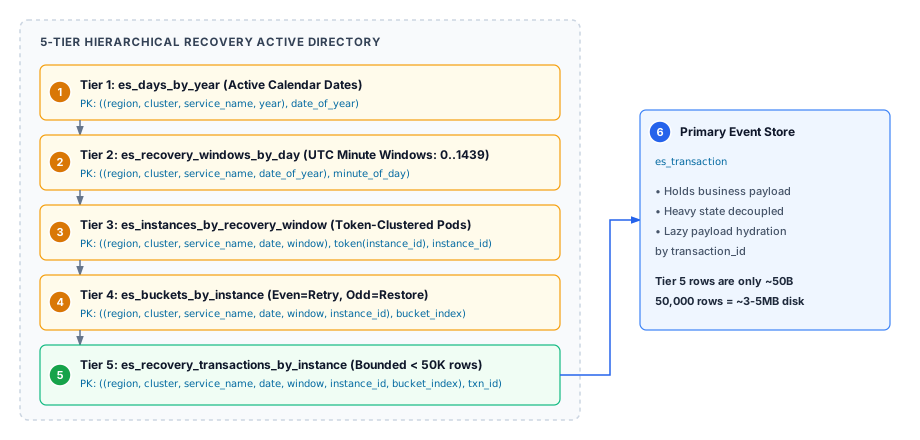
The active directory tree operates through five coordinated tiers:
| 1 | Tier 1 (es_days_by_year): Active calendar dates index preventing empty table scans. |
| 2 | Tier 2 (es_recovery_windows_by_day): UTC minute windows (0 to 1439) processed in ascending order (minute_of_day ASC). |
| 3 | Tier 3 (es_instances_by_recovery_window): Pod instance tokens clustered by token(instance_id) for spatial worker slicing. |
| 4 | Tier 4 (es_buckets_by_instance): Bucket index directory (even = retry, odd = restore). |
| 5 | Tier 5 (es_recovery_transactions_by_instance): Bounded metadata partitions (< 50,000 rows, ~3–5MB) dropped via single partition tombstones in $O(1)$ time. |
| 6 | Primary Event Store (es_transaction): Decoupled heavy state hydrated lazily by transaction_id. |
Who Does What: The Four Roles
Standard-Nodes (Live Traffic Pods)
These are the pods your users talk to — the pods running order-service, payment-service, etc.
Their job in the Recovery Engine:
-
On every transaction start → write a Restore watchdog row into a far-future window (odd bucket).
-
On transient step failure → write a Retry record into the next-minute window (even bucket).
-
On transaction completion → delete the Restore watchdog row.
Standard-Nodes write directly to Cassandra. They never communicate with the Ring Coordinator. Their writes are completely independent — no cross-pod coordination whatsoever.
Retry-Nodes (Recovery Workers)
Dedicated orchestrator instances with the StackSaga recovery subsystem enabled. They have no live user traffic — their only job is processing the Recovery Engine directory.
Each Retry-Node holds a non-overlapping Murmur3 token lease from the Ring Coordinator. This lease defines which fraction of the 64-bit token ring the node is responsible for. Because leases do not overlap, two Retry-Nodes never process the same transaction — without any database-level locks.
The RSocket Ring Coordinator
A lightweight standalone service (stacksaga-ring-coordinator) that divides the 64-bit Murmur3 token space into non-overlapping sector leases and issues them to active Retry-Nodes over persistent RSocket connections.
|
Is the Ring Coordinator a single point of failure? |
Node-0 (Compactor Overseer)
Node-0 is not a separate binary or service. It is simply the Retry-Node holding the lowest token lease issued by the Ring Coordinator.
In addition to its normal recovery work, Node-0 has a unique responsibility: it is the only node that is allowed to delete completed minute windows from Tier 2 and completed calendar dates from Tier 1.
Every other Retry-Node cleans up only its own partition-level data (Tiers 3, 4, 5). Node-0 handles the shared upper tiers (1 and 2) after verifying that the entire cluster has finished with that window.
Feature 1: Retry
What Triggers a Retry
A retry is triggered when a saga step calls a downstream service and receives a transient error response. Examples: HTTP 503 Service Unavailable, connection timeout, temporary database error.
The Standard-Node processing that saga step:
-
Does not fail the business transaction.
-
Records the failure.
-
Writes a lightweight pointer into the next available minute window (W+1) of the 5-tier directory.
-
Returns to serving live traffic immediately.
A Retry-Node picks up that pointer during its next window scan and re-invokes the saga step automatically.
Bounded Partitions: The Instance-Level Bucketing Strategy
A common concern: if a major downstream service fails and 10,000 pods all start writing retry records simultaneously, what stops a single Cassandra partition from exploding past 100MB?
The answer is instance-level local bucketing.
Instead of all pods writing into a shared partition, the Tier 5 partition key includes the writing pod’s unique instance_id:
PRIMARY KEY (
  (region, cluster, service_name, date_of_year, minute_of_day, instance_id, bucket_index),
  transaction_id
)
This means:
-
pod-order-awrites into its own dedicated partition. -
pod-order-bwrites into a completely separate dedicated partition. -
Neither pod can pollute the other’s partition.
Each pod tracks its own row count using a JVM-local AtomicLong counter.
No database read. No distributed lock. The counter increment takes ~2 nanoseconds.
When the counter reaches recovery.bucket-size (default: 50,000), the pod atomically rolls over to the next even bucket index.
Pod-order-a local state:
  retryCounter = 0   → writes into bucket_index = 0   (even)
  retryCounter = 50,000 → rolls to bucket_index = 2   (even)
  retryCounter = 100,000 → rolls to bucket_index = 4  (even)

Pod-order-b local state (independent):
  retryCounter = 0   → writes into bucket_index = 0   (even)
  retryCounter = 50,000 → rolls to bucket_index = 2   (even)
Each 50,000-row partition holds only metadata pointers (~50–100 bytes per row) — never business payloads. A full 50,000-row partition consumes ~3MB to 5MB on disk, regardless of saga payload size. Cassandra’s 100MB partition limit is structurally impossible to reach.
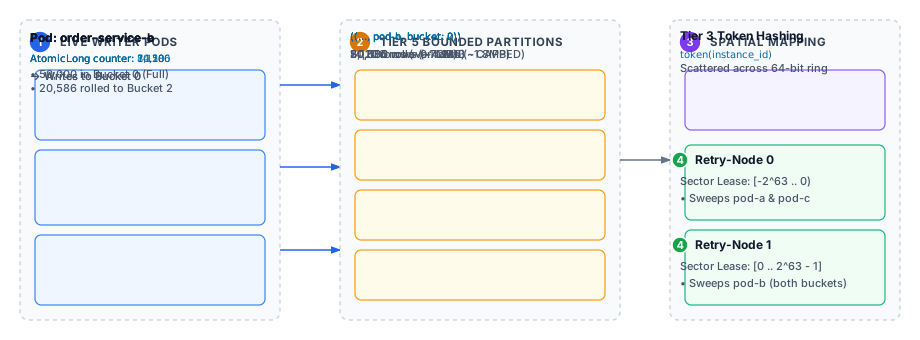
| 1 | Live Writer Pods: Each pod maintains JVM-local AtomicLong counters. Checking and incrementing takes ~2 nanoseconds without database locks. |
| 2 | Tier 5 Bounded Partitions: Partitions are scoped by instance_id and bounded to 50,000 rows. When full, the pod atomically rolls to the next even index (e.g. Bucket 0 → Bucket 2). |
| 3 | Spatial Mapping in Tier 3: Pods register their token hash token(instance_id) uniformly across the 64-bit token ring. |
| 4 | Autonomous Worker Discovery: Retry-Nodes sweep assigned token sector leases, discovering instances deterministically without cross-worker locking. |
| 5 | Lifecycle Decoupling: Writer pods can terminate, restart, or scale to zero immediately after writing failure records without impacting recovery. |
|
What if a pod restarts? Its counter resets to 0 — does it overwrite the old bucket? |
The Dual-Window Model: Writers and Readers Never Collide
Why windows at all? Why not just store retry_at = NOW() + 1 minute?
In SQL, you would SELECT WHERE retry_at ⇐ NOW() and let the B-Tree index find rows efficiently.
Cassandra has no such global index across partitions — that query would be a full cluster scan.
The solution: divide the day into discrete numbered windows (0 through 1439 for 1-minute granularity, 0 through 287 for 5-minute granularity).
Each window number becomes an exact partition key component — queryable in a single targeted read.
But windows introduce a new problem: what stops a Retry-Node from reading window 500 while a Standard-Node is still writing new failure records into window 500?
The Dual-Window Rule solves this with a single invariant:
-
Standard-Nodes always write into W+1 (the next window, not the current one).
-
Retry-Nodes only read windows ≤ W (the current window or older — never the future one).
These two sets never intersect. Writers are always one window ahead of readers. There are no database locks, no coordination messages, no timestamps to compare.
Current time: 14:23 UTC → Read window W = 1423

Standard-Nodes write into: W+1 = 1424  ← never touched by Retry-Nodes
Retry-Nodes read from:     W   = 1423  ← never written to by Standard-Nodes anymore

At midnight rollover (W = 1439):
  W+1 = 0 of tomorrow's date
  → the write window crosses into the next calendar day automatically
This also provides a free cooldown buffer of up to 70 seconds before a failed step is first retried. This prevents the Retry-Node from immediately hammering a downstream service that is still rebooting.
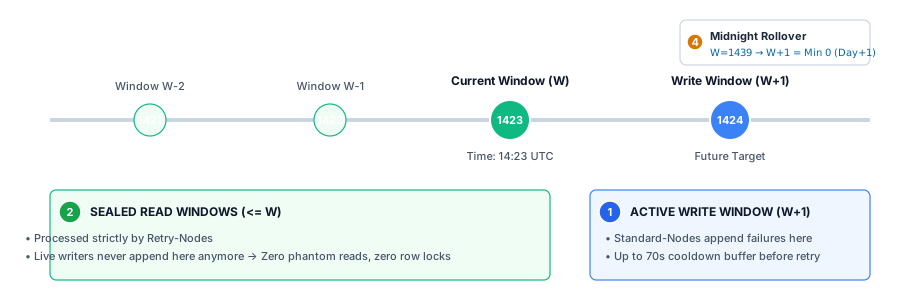
| 1 | Active Write Window ($W+1$): Standard-Nodes write transient failures into the future window, completely isolated from active reader queries. |
| 2 | Sealed Read Windows ($\le W$): Retry-Nodes read only completed, sealed windows. Zero phantom reads, zero lock contention. |
| 3 | Cooldown Buffer: Writing to $W+1$ provides an automatic buffer (up to 70 seconds) before the first retry attempt. |
| 4 | Midnight Rollover: Window 1439 wraps smoothly to minute 0 of the next calendar day (date_of_year + 1). |
How Retry-Nodes Find Work: Spatial Isolation via Murmur3
When multiple Retry-Nodes run in parallel, they must each process a non-overlapping slice of the work. Cassandra has no row locks — coordination must happen outside the database.
StackSaga uses Murmur3 Token Range Leasing:
-
Every Standard-Node registers its
instance_idandtoken(instance_id)in Tier 3 (es_instances_by_recovery_window) when it writes a failure record. -
The Ring Coordinator divides the 64-bit token space into non-overlapping sector leases and assigns one to each Retry-Node.
-
Each Retry-Node queries Tier 3 with its leased token bounds:
SELECT instance_id, instance_id_token
FROM es_instances_by_recovery_window
WHERE region = :region AND cluster = :cluster AND service_name = :service_name
  AND date_of_year = :date AND minute_of_day = :window
  AND instance_id_token >= :lease_min_token
  AND instance_id_token <= :lease_max_token;
Because token leases don’t overlap, two Retry-Nodes never receive the same instance_id from this query.
They process completely separate slices of the work — without any distributed locking.
When Retry-Nodes are added or removed, the Ring Coordinator recalculates and redistributes leases. Throughput scales linearly with the number of Retry-Nodes.
Every query and every step execution verifies that the current timestamp is within the lease validity window. If a lease expires (e.g., network partition), execution stops immediately — preventing split-brain processing while the coordinator redistributes leases.
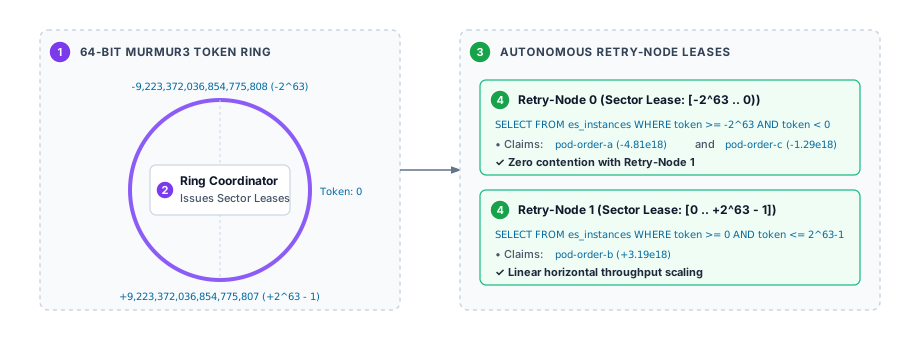
| 1 | 64-bit Murmur3 Token Ring: Spans -2^63 to +2^63 - 1. |
| 2 | Ring Coordinator: Divides the token ring into non-overlapping sectors and issues time-bounded leases. |
| 3 | Worker Leases: Each Retry-Node queries Tier 3 using its leased sector bounds (WHERE token >= min AND token < max). |
| 4 | Autonomous Slicing: Linear horizontal scaling with zero duplicate processing and zero database row locks. |
Processing a Retry Bucket: The Complete Steps
Once a Retry-Node has identified an instance_id in its token range, it processes that instance’s work:
| 1 | Read Tier 4 (es_buckets_by_instance) to discover all bucket indexes for this instance + window. |
| 2 | Read Tier 5 (es_recovery_transactions_by_instance) for each even bucket to stream transaction_id values. |
| 3 | Fetch the saga payload lazily from es_transaction using transaction_id. Tier 5 never stores the payload. |
| 4 | Re-invoke the saga step with controlled concurrency (recovery.concurrency, default: 100). |
| 5 | Delete the bucket partition from Tier 5 when all transactions in the bucket are dispatched: |
DELETE FROM es_recovery_transactions_by_instance
WHERE region = :r AND cluster = :c AND service_name = :svc
  AND date_of_year = :date AND minute_of_day = :window
  AND instance_id = :id AND bucket_index = :bucket;
This partition-level delete writes a single partition tombstone — Cassandra drops the entire partition during the next SSTable compaction in O(1) time. No tombstone accumulation.
| 1 | Delete the Tier 3 instance marker when all buckets for this instance are finished. |
Safe Shutdown: No Transaction Lost on Pod Kill
What if Kubernetes kills a Retry-Node while it is halfway through processing 50,000 transactions?
The traversal pipeline enforces a strict invariant: a bucket partition is never deleted unless 100% of its transactions have been dispatched.
function onBucketBatchComplete(bucket, total, executed):
    if isShutdownRequested() OR executed < total:
        // Pod is stopping or not all rows were processed.
        // DO NOT delete the partition — preserve it for the next worker.
        return

    // Only reach here when 100% dispatched and pod is healthy.
    dropBucketPartition(bucket)
    deleteBucketIndexRow(bucket)
When a Retry-Node is killed mid-bucket, the partition stays intact in Cassandra.
The next Retry-Node (or the restarted one) picks it up from row 1.
Execution markers (es_execution_markers) ensure that already-completed saga steps are detected as COMMITTED and skipped — so only the genuinely unprocessed transactions (e.g., rows #25,001 through #50,000) actually execute again.
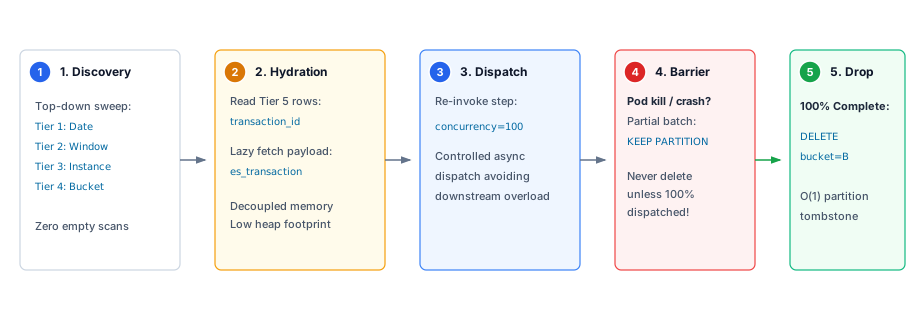
| 1 | Discovery: Top-down sweep from Tier 1 down to Tier 4 without empty table scans. |
| 2 | Hydration: Stream lightweight pointers from Tier 5 and lazily fetch payloads from es_transaction. |
| 3 | Dispatch: Concurrent re-invocation up to recovery.concurrency (default: 100). |
| 4 | Safe Shutdown Barrier: If a pod is killed mid-bucket, the partition is preserved in Cassandra; completed steps are skipped upon restart. |
| 5 | O(1) Compaction Drop: When 100% dispatched, the entire bucket partition is dropped with a single partition tombstone. |
Deep Historical Recovery
A Retry-Node does not only process the current window — it scans backwards in time on startup.
The recovery.retry.lookback-days property (default: 2) tells the worker to generate candidate dates from today - 2 days through today.
It processes them in strict chronological order:
-
Query Tier 1 (
es_days_by_year) for active dates within the lookback range. -
For each date, query Tier 2 (
es_recovery_windows_by_day) for active windows in ascending order. -
Process each window normally.
If the entire service was offline for a weekend, all of Friday’s, Saturday’s, and Sunday’s pending retry windows are systematically discovered and processed on Monday morning — oldest first.
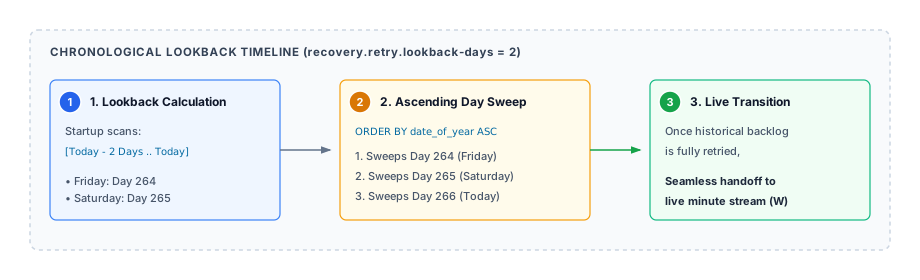
| 1 | Lookback Range Calculation: On startup, workers calculate candidate dates based on recovery.retry.lookback-days. |
| 2 | Ascending Day Sweep: Workers traverse Tier 1 in ascending order (date_of_year ASC), recovering older backlog first. |
| 3 | Live Transition: Once historical windows are processed, workers transition smoothly to the live minute stream ($W$). |
Feature 2: Restore
The Problem: The Silent Crash
Retry handles failures that are detected — the saga step ran, the downstream service returned an error, and StackSaga recorded it.
But what about this scenario:
-
User places an order.
-
order-servicepod starts processing the saga — calls inventory, calls payment. -
Mid-flight, between the inventory step and the payment step, the data centre loses power.
-
The pod is gone. No error was written. No retry record was created.
-
When the pod restarts, it has no memory of transaction
T-12345ever existing.
Without a dedicated mechanism, transaction T-12345 is permanently lost.
The user’s money may or may not have been charged. Inventory may or may not have been reserved. The system is in an unknown state.
Restore solves this with a dead-man’s switch: write a watchdog row at the start, delete it at the end. If the end never comes, the watchdog row survives and triggers recovery.
How Restore Works: The Dead-Man’s Switch
When a Standard-Node starts processing any transaction, it immediately:
-
Computes a far-future restore window:
restore_window = current_window + recovery.restore.delay-windows Actual time ahead = delay-windows × window-interval-minutes Example: window-interval-minutes = 1 (1-minute windows) restore.delay-windows = 600 → watchdog row is placed 600 minutes (10 hours) ahead -
Writes a lightweight watchdog row into an odd bucket in Tier 5 at that restore window.
-
Stores the full partition path
(date, window, instance_id, odd_bucket_index)inside thees_transactionrecord.
Then there are exactly two possible outcomes:
| Outcome | What Happens |
|---|---|
Transaction completes (success or compensation) |
The Standard-Node reads the restore path from |
JVM crashes mid-transaction |
The watchdog row was never deleted. 600 minutes later, a Retry-Node traverses the directory, reaches that restore window, finds the watchdog row in the odd bucket, and re-invokes the transaction. The transaction is recovered automatically — with zero developer action. |
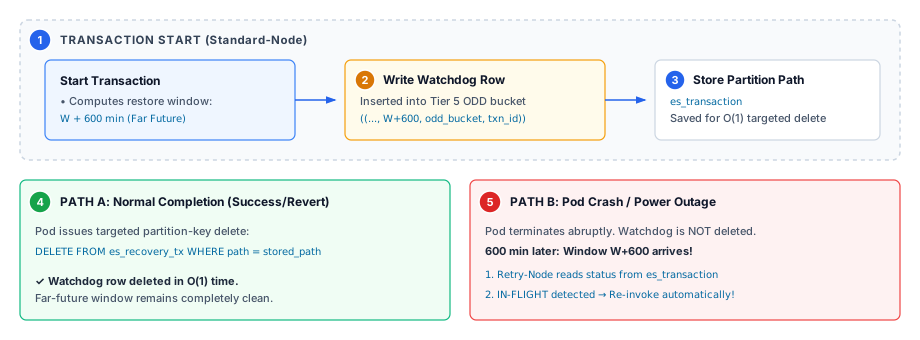
| 1 | Transaction Start: Standard-Node registers watchdog row at far-future window $W + ext{delay}$ (e.g. +600 min). |
| 2 | Watchdog in Odd Bucket: Written into Tier 5 odd bucket partition. |
| 3 | Path Stored in Ledger: Partition path stored in es_transaction for targeted deletion. |
| 4 | Path A (Normal Completion): Targeted $O(1)$ delete removes watchdog row; window stays clean. |
| 5 | Path B (Pod Crash): Watchdog row persists in Cassandra. When window arrives, Retry-Node checks status and automatically re-invokes. |
What Happens at Restore Pickup
When a Retry-Node picks up a transaction from a restore bucket (any odd bucket_index), it does not blindly re-execute the transaction.
The saga engine first performs a mandatory status check:
status = SELECT running_status FROM es_transaction WHERE transaction_id = :id

if status == PROCESS_COMPLETED or status == REVERT_COMPLETED:
    // Transaction already finished. The watchdog row delete must have failed.
    // Silently delete the restore row and move on.
    deleteRestoreRow(path)
    return

// Status shows transaction is still in-flight (or unknown).
// Re-invoke it.
reInvoke(transaction)
This two-stage check guarantees:
-
Completed transactions are never re-executed — even if the watchdog row was not deleted due to a network blip at completion time.
-
Genuinely orphaned transactions are always recovered — even after complete server loss.
Why Restore Uses Odd Bucket Indexes
Restore rows and Retry rows are stored in the same Tier 5 table.
The only distinction is the bucket_index:
-
Even bucket indexes (0, 2, 4 …) → Retry records. Written only on transient failure.
-
Odd bucket indexes (1, 3, 5 …) → Restore records. Written on every transaction start.
Each Standard-Node maintains two independent AtomicLong counters per write window:
retryCounter  = AtomicLong()  // even buckets: 0, 2, 4 ...
restoreCounter = AtomicLong() // odd  buckets: 1, 3, 5 ...

// Retry bucket index for slot N:
evenBucket = (retryCounter.incrementAndGet() / bucketSize) * 2

// Restore bucket index for slot N:
oddBucket = (restoreCounter.incrementAndGet() / bucketSize) * 2 + 1
Why not just use separate tables for retry and restore? Same physical table = same infrastructure, same Tier 1–4 directory, same Retry-Node traversal logic, same Ring Coordinator leasing. No duplication.
Then why separate with odd/even instead of just mixing rows in the same bucket? Three structural reasons:
-
Tombstone isolation. Restore rows are written for every transaction. Most are deleted within minutes (on successful completion). This creates heavy cell tombstone accumulation inside restore partitions. If restore rows were mixed into retry partitions, a Retry-Node reading 50,000-row retry buckets would have to scan through thousands of tombstones to find a handful of genuinely orphaned transactions. After enough tombstones, Cassandra aborts the query entirely (
ReadFailureException). By isolating restore into odd partitions, retry partitions (even) remain completely tombstone-free. -
Accurate live-row count. The in-memory
AtomicLongcounter tracks how many rows the pod has written, not how many remain after deletions. If restore rows (mostly tombstoned) shared a bucket with retry rows, the counter would declare the partition full (50,000 written) even though the real live row count is much lower — wasting partition capacity. Separate counters give each bucket type an independent, accurate live-row count. -
Independent window schedules. Retry windows are 1 window ahead (W+1). Restore windows are hundreds of windows ahead (W + 600). These are entirely different points in time. A single shared counter spanning both would make it impossible to bound either type’s partitions correctly.
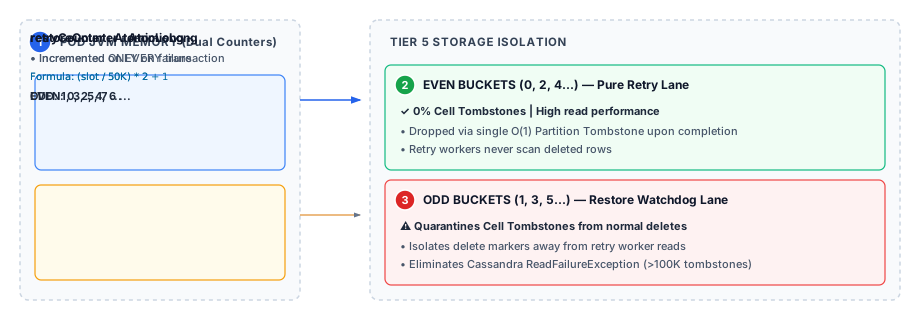
| 1 | Dual In-Memory Counters: Independent AtomicLong counters for retry (even) and restore (odd). |
| 2 | Even Buckets (Pure Retry): 0% cell tombstones. High read performance, dropped via single partition tombstones. |
| 3 | Odd Buckets (Restore Watchdog): Quarantines high-frequency cell tombstones from completed transactions away from retry reads, eliminating ReadFailureException. |
The Full Lifecycle Pseudocode
// ── TRANSACTION START ─────────────────────────────────────────────────────
function onTransactionStart(transaction):
    restoreWindow = currentWindow + delayWindows          // far future
    slot          = restoreCounter.incrementAndGet()
    oddBucket     = (slot / bucketSize) * 2 + 1

    upsertTier1(restoreWindow)                            // idempotent
    upsertTier2(restoreWindow)                            // idempotent
    upsertTier3(restoreWindow, instanceId)                // idempotent
    upsertTier4(restoreWindow, instanceId, oddBucket)     // idempotent
    insertTier5(restoreWindow, instanceId, oddBucket, transaction.id)

    saveRestorePathInTransaction(transaction.id,
        restoreWindow, instanceId, oddBucket)             // stored in es_transaction

// ── TRANSIENT STEP FAILURE ────────────────────────────────────────────────
function onTransientFailure(transaction):
    retryWindow = currentWindow + 1                       // W+1
    slot        = retryCounter.incrementAndGet()
    evenBucket  = (slot / bucketSize) * 2

    upsertTier1(retryWindow)
    upsertTier2(retryWindow)
    upsertTier3(retryWindow, instanceId)
    upsertTier4(retryWindow, instanceId, evenBucket)
    insertTier5(retryWindow, instanceId, evenBucket, transaction.id)

// ── TRANSACTION COMPLETION ────────────────────────────────────────────────
function onTransactionComplete(transaction):
    path = getRestorePathFromTransaction(transaction.id)
    deleteRestoreRow(path)                                // O(1) partition-key DELETE
Scaling: Virtual Clusters
Instance-level bucketing prevents any single pod’s partition from exceeding 50,000 rows. But what about Tier 3 itself?
Tier 3’s partition key is:
PRIMARY KEY ((region, cluster, service_name, date_of_year, minute_of_day), instance_id_token, instance_id)In an extreme scenario — 50,000+ distinct pods all experiencing failures within the same minute — Tier 3’s single partition would exceed Cassandra’s recommended 50,000-row limit.
Virtual clusters solve this without any new infrastructure.
By configuring different pods with a different stacksaga.instance.cluster value, their records land in a different Tier 3 partition (because cluster is part of the composite partition key).
All virtual clusters share the same physical Cassandra keyspace and the same tables — the isolation is purely in the partition key.
# Pods in cluster group 1
stacksaga:
  instance:
    region: us-central
    cluster: us-central-cluster-1

# Pods in cluster group 2
stacksaga:
  instance:
    region: us-central
    cluster: us-central-cluster-2
Each virtual cluster has its own Ring Coordinator deployment. There is no cross-cluster coordination — each cluster is a fully autonomous processing cell.
Real-world pod counts (for reference):
  A typical large-scale Kubernetes cluster: 5,000 – 10,000 pods
  The Tier 3 partition ceiling: 50,000 pods per cluster per minute window

For 99.9% of deployments, the default single cluster is sufficient.
Virtual clusters exist for the rare hyperscale case where even 10,000 pods per cluster is not enough.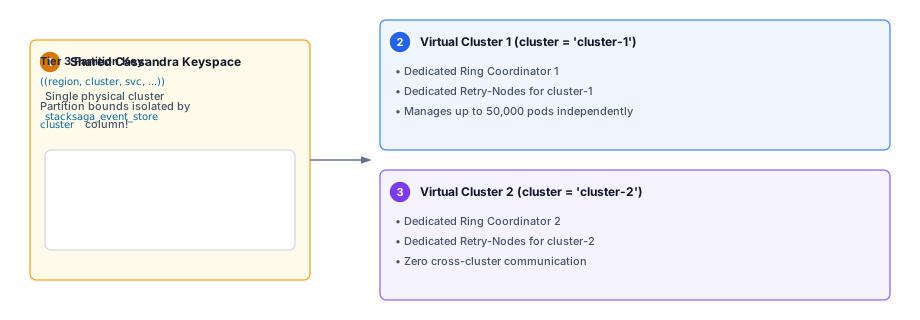
| 1 | Shared Cassandra Keyspace: Single physical Cassandra cluster and keyspace stacksaga_event_store. |
| 2 | Virtual Cluster 1 (cluster = cluster-1): Autonomous deployment cell with dedicated Ring Coordinator managing up to 50,000 pods. |
| 3 | Virtual Cluster 2 (cluster = cluster-2): Second autonomous cell isolated via composite partition key region, cluster, …. |
Directory Compaction: Keeping the Directory Clean
When a Retry-Node finishes processing all buckets for a given instance in a given window, it:
-
Drops each completed even/odd bucket partition from Tier 5 (partition tombstone — O(1)).
-
Deletes the bucket index rows from Tier 4.
-
Deletes the instance marker from Tier 3.
But who deletes the minute window from Tier 2? And the calendar date from Tier 1?
The Premature Deletion Problem
Imagine two Retry-Nodes processing window 500:
-
Retry-Node 1 has 5 transactions. It finishes in 100ms.
-
Retry-Node 2 has 40,000 transactions. It is still running.
If Retry-Node 1 is allowed to delete minute window 500 from Tier 2 immediately after finishing, the window disappears from the directory. If Retry-Node 2 then restarts (pod killed by Kubernetes), it re-discovers its work by scanning Tier 2 — but minute 500 is gone. Those 40,000 transactions are orphaned permanently.
Node-0’s Two-Gate Protocol
Node-0 is the sole authority for deleting shared upper-tier directory nodes. Before deleting any minute window from Tier 2, Node-0 must pass both gates:
Gate 1 — Cluster-Wide Completion Check:
-- Query Tier 3 WITHOUT token filtering (full partition scan)
SELECT instance_id FROM es_instances_by_recovery_window
WHERE region = :r AND cluster = :c AND service_name = :svc
  AND date_of_year = :date AND minute_of_day = :window;
If this returns any rows, at least one Retry-Node somewhere still has pending work in this window. Node-0 waits.
Gate 2 — Time Has Passed: Node-0 verifies that the current UTC time is past the end of window W. Even if all instance markers are gone, a brief wait ensures no late-writing Standard-Node is still writing new retry records into window W+1 that might technically belong to this same window.
Only when both gates pass does Node-0 safely delete the minute window from Tier 2. After all windows for a given date are cleared, it deletes the date from Tier 1.
This protocol eliminates the premature deletion race condition without any distributed locking.
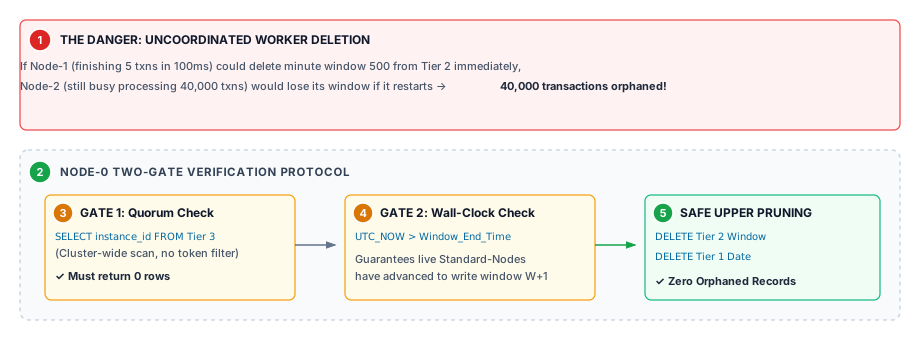
| 1 | Premature Deletion Hazard: Uncoordinated worker deletion causes peer active transactions to be orphaned. |
| 2 | Node-0 Compactor Overseer: Sole authority to delete shared upper tiers (Tier 2 and Tier 1). |
| 3 | Gate 1 (Cluster-Wide Quorum): Full cluster query on Tier 3 must return 0 rows. |
| 4 | Gate 2 (Wall-Clock Check): Verifies current UTC time has progressed past window end. |
| 5 | Safe Upper Pruning: Safely deletes Tier 2 minute window and Tier 1 calendar date. |
Properties Reference
| Property | Default | Type | Description |
|---|---|---|---|
Connection Properties |
|||
|
|
|
Consistency level for read operations. |
|
|
|
Consistency level for write operations. |
|
|
|
Path to the DataStax Java driver configuration file. |
Write Protection Properties |
|||
|
|
|
System-wide default write protection mode. |
|
|
|
Default LWT lease TTL for |
|
|
|
Per-saga-domain mode override. Falls back to |
|
|
|
Per-saga-domain lease TTL override for |
Transaction Lifetime |
|||
|
|
|
How long a transaction stays in the active event store before being quarantined. Quarantined transactions are not re-exposed to the Recovery Engine. |
Recovery Engine — Shared Properties (apply to both Retry and Restore) |
|||
|
|
|
Time window granularity in minutes. Must evenly divide 1440. |
|
|
|
Maximum rows per bucket partition (even and odd). Controls Tier 5 partition size. Each 50,000-row partition consumes ~3–5MB on disk. |
|
|
|
Maximum concurrent transaction re-invocations per bucket processing cycle. |
Recovery Engine — Retry-Specific |
|||
|
|
|
Number of historical calendar days to scan backwards on Retry-Node startup. Enables recovery after extended outages. Workers process all historical windows chronologically before reaching today. |
Recovery Engine — Restore-Specific |
|||
|
|
|
Number of windows ahead at which the restore watchdog row is placed when a transaction starts. |
stacksaga:
  cassandra:
    read-consistency-level: LOCAL_QUORUM
    write-consistency-level: LOCAL_QUORUM
    config: classpath:stacksaga-cassandra.conf

    transaction:
      lifetime: 24h

    write-protection:
      default-mode: RELAXED_WITH_DEDUP
      default-lease-duration: 5s
      domains:
        payment-saga:
          mode: STRICT
          lease-duration: 10s

    recovery:
      window-interval-minutes: 1          # 1440 windows per day
      bucket-size: 50000                  # ~5MB max per partition
      concurrency: 100                    # parallel re-invocations

      retry:
        lookback-days: 2                  # scan back 2 days on startup

      restore:
        delay-windows: 600                # watchdog 600 min ahead